OpusClip Review: 7 Powerful Reasons Creators Love It
Opusclip review — I still remember the first time I tried to turn a 40-minute YouTube video into short clips for TikTok and Reels. It took me hours.
Cutting, adding captions, testing hooks, exporting… and then realizing the clip still felt boring. That frustration is exactly why I started testing AI tools like OpusClip.
If you’re a creator, marketer, or solopreneur trying to grow on short-form platforms, this opusclip review will save you time, money, and a lot of headaches.
In this guide, I’ll walk you through what OpusClip really does, how it works in practice, who it’s best for, and whether it’s actually worth paying for. This is not hype. It’s my real, hands-on take.
What Is OpusClip?
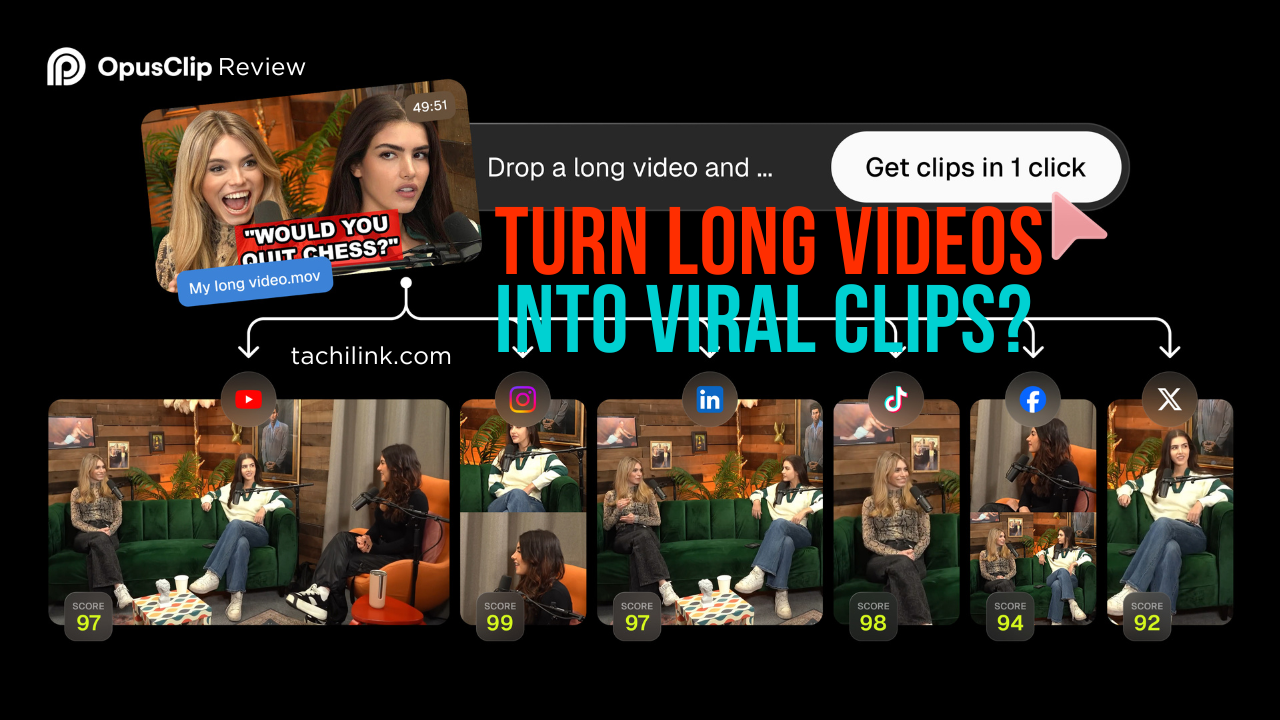
OpusClip is an AI-powered video repurposing tool designed to automatically turn long-form videos into short, viral-style clips. You upload a YouTube video, podcast, webinar, or raw footage, and OpusClip uses AI to:
- Detect the most engaging moments
- Cut them into short clips (usually under 60 seconds)
- Add animated captions automatically
- Optimize clips for TikTok, Instagram Reels, and YouTube Shorts
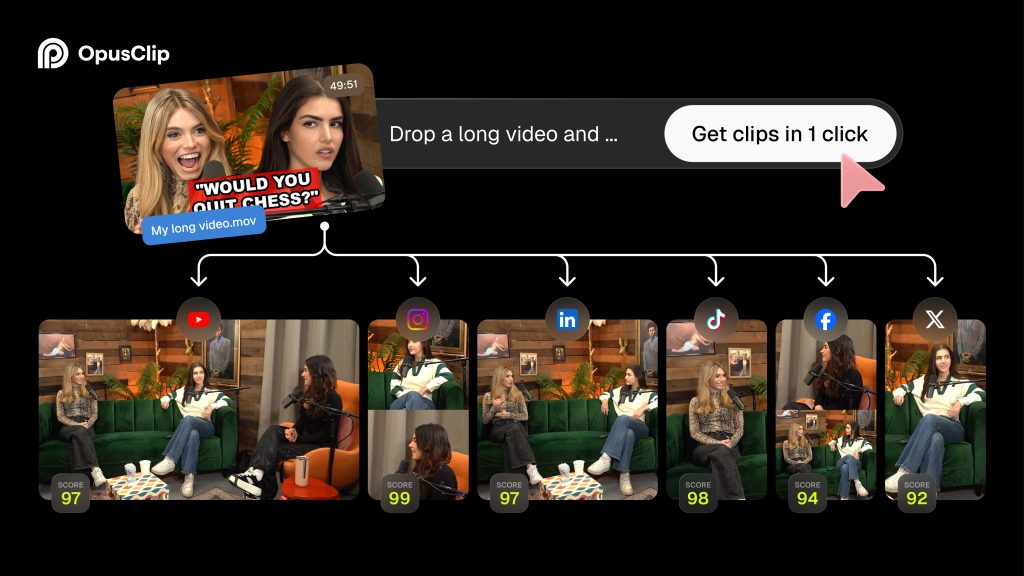
At its core, OpusClip solves one problem: turning long content into short content fast.
This opusclip review focuses on real usage, not just features listed on the homepage.
Why Short-Form Content Matters More Than Ever
Before we go deeper into features, let’s talk strategy.
Short-form video is no longer optional. TikTok, Reels, and Shorts are where attention lives right now. Even if your main platform is YouTube or a podcast, repurposing content is the fastest way to:
- Reach new audiences
- Increase content output without extra filming
- Drive traffic back to long-form content
- Build a personal or brand presence faster
I’ve shared more about content repurposing strategies on my site in articles about AI tools for creators and automation workflows on tachilink.com. OpusClip fits directly into that ecosystem.
How OpusClip Works (Step by Step)
1. Upload or Import Your Video
You can paste a YouTube link or upload a video file directly. This works well if you already publish long-form videos or client content.
2. AI Analysis and Clip Detection
This is where OpusClip shines. The AI scans your video for:
- Emotional peaks
- Strong hooks
- Clear talking points
- High engagement potential
Instead of random cuts, it tries to find moments that feel complete and scroll-stopping.
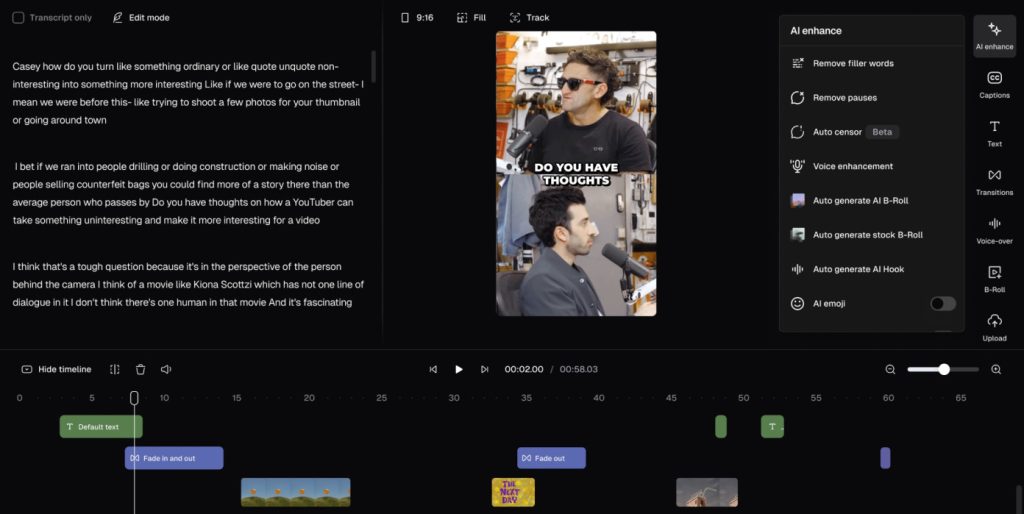
3. Automatic Captions and Formatting
Captions are added automatically, including:
- Word-by-word animations
- Highlighted keywords
- Mobile-friendly framing
This is huge because captions are non-negotiable for short-form content.
4. Opusclip Review, Edit, and Export
You can tweak text, adjust clip length, or remove parts you don’t like. Then export in formats optimized for TikTok, Instagram Reels, or YouTube Shorts.
This workflow is the reason many creators talk positively in every opusclip review you’ll find online.
Opusclip review: Key Features Explained
AI Viral Clip Detection
OpusClip doesn’t just cut randomly. It scores clips based on predicted engagement. While it’s not perfect, it’s surprisingly accurate for talking-head content.
Auto Captions With Style Options
Captions are readable, dynamic, and designed for retention. This alone can replace manual caption tools.
Multi-Platform Optimization
Each clip is formatted vertically and framed correctly for mobile viewers.
Team and Creator-Friendly Workflow
If you manage multiple clients or channels, OpusClip saves hours every week.
OpusClip Reivew Pricing: Is It Worth It?
Pricing changes over time, but generally OpusClip offers:
- A free plan with limited clips
- Paid plans based on monthly clip credits
From my experience, if you publish long-form content at least once per week, the paid plan quickly pays for itself in saved editing time.
Compared to hiring a video editor or spending hours in tools like Final Cut Pro or DaVinci Resolve, OpusClip is efficient.
I’ve reviewed other AI video tools on tachilink.com, and OpusClip is one of the more creator-focused options.

Pros and Cons (Honest Breakdown)
Biggest Values of OpusClip
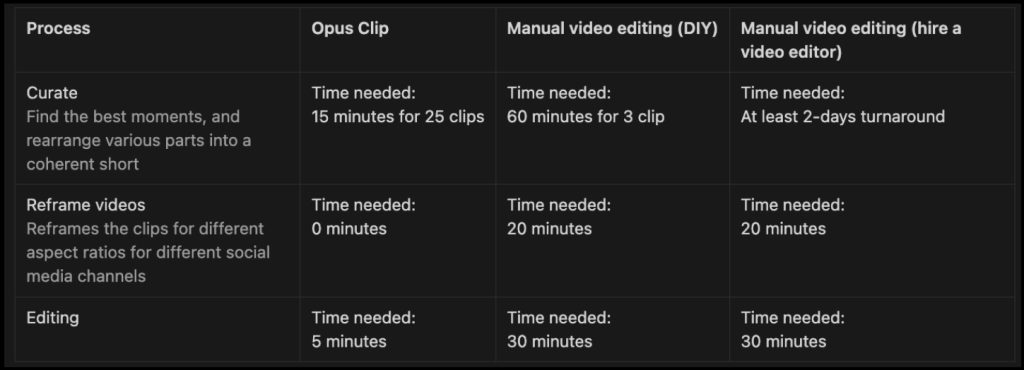
Create 10x faster and post daily. 90% time saved. No editing skills required.
Opus Clip can create 30 clips in 10 minutes and outperform manual video editing by saving 90% time and tons of money.
Grow faster: Gain thousands of views in one day
Hundreds of creators shared with us that days after they posted shorts created by Opus Clip, they gained thousands of views and tons of subscribers.
Pros
- Massive time savings
- Good AI clip selection
- Excellent captions for short-form platforms
- Beginner-friendly interface
Cons
- Less control than manual editing
- AI sometimes misses context
- Best results require talking-head or podcast-style content
This balance is important in any opusclip review. It’s powerful, but not magic.
Who Should Use OpusClip?
OpusClip is ideal if you are:
- A YouTuber repurposing long videos
- A podcaster growing on social media
- A coach, consultant, or educator
- A marketer managing multiple channels
- An affiliate marketer building short-form traffic funnels
If you already use AI tools to scale content, OpusClip fits naturally into that workflow.
Who Should NOT Use OpusClip?
You might want to skip OpusClip if:
- You need cinematic, highly customized edits
- Your content is mostly visual (B-roll heavy)
- You prefer full manual control over every frame
In those cases, traditional video editing software may still be better.
OpusClip vs Manual Editing
Here’s the real comparison:
- Manual editing: Maximum control, high time cost
- OpusClip: Fast output, good quality, scalable
For growth-focused creators, speed often beats perfection. That’s the core reason I continue to recommend OpusClip in my opusclip review.
Tips to Get Better Results With OpusClip
Based on my testing:
- Use clear audio and minimal background noise
- Speak in complete thoughts and sentences
- Add strong hooks early in your long-form content
- Review clips before posting, don’t auto-publish blindly
Following these tips improves AI clip accuracy significantly.
Real Use Cases I’ve Tested
- Turning a 30-minute tutorial into 10 short clips
- Repurposing webinar recordings
- Creating TikTok clips for affiliate content
In each case, OpusClip reduced editing time by more than 70%.
Final Verdict: Is OpusClip Worth Using?
After weeks of testing, my answer is yes — with realistic expectations. OpusClip is not here to replace professional editors. It’s here to help creators publish more consistently.
If your goal is growth, reach, and efficiency, this opusclip review should make the decision clear.
Try OpusClip Yourself
If you want to test it, I recommend starting with the official platform to explore the free plan and see if it fits your workflow:
Opusclip review: Conclusion
To wrap it up, opusclip review comes down to one thing: leverage. OpusClip gives you leverage over your time and content. For creators who want to scale without burning out, it’s a smart addition to your AI toolkit.
If you’re serious about content repurposing, automation, and building traffic through short-form video, OpusClip deserves a spot in your workflow.
Disclosure: This article may contain affiliate links. If you choose to use OpusClip through these links, I may earn a commission at no additional cost to you. This helps support my work and allows me to continue creating in-depth, honest reviews.
FAQ opusclip review
1. Is OpusClip worth it for content creators?
Yes, OpusClip is worth it if you regularly create long-form videos and want to repurpose them into short clips quickly. In my experience, it saves hours of manual editing and helps maintain consistent posting on TikTok, Instagram Reels, and YouTube Shorts.
2. Is OpusClip free to use?
OpusClip offers a free plan with limited clip generation, allowing users to test the platform before upgrading. For serious creators, the paid plans provide better value with higher clip limits and faster workflows.
3. How accurate is OpusClip’s AI clip detection?
OpusClip’s AI is quite accurate for talking-head videos, podcasts, and educational content. While it may occasionally miss context, reviewing and fine-tuning clips before publishing usually delivers strong results.
4. Who should use OpusClip?
OpusClip is ideal for YouTubers, podcasters, coaches, educators, and marketers who want to scale short-form content without spending hours on manual video editing.
5. Can OpusClip replace manual video editing?
No, OpusClip does not fully replace manual editing tools. Instead, it complements them by handling fast content repurposing, while advanced creative edits are better done with traditional video editing software.