
Pictory Review: 7 Brutal Truths You Must Know Before Buying
When I first started digging into pictory review content online, I honestly didn’t trust any of them. Everything felt too polished, too “sponsored,” and not at all like what real creators actually deal with.
So I decided to sit down, test Pictory myself on multiple real projects, and write the kind of article I wish existed when I was searching.
Right from the start, I realized something surprising: Pictory isn’t just another AI video tool. It fills a very specific need in a world where content creators are constantly drowning in long-form scripts, blog posts, Zoom recordings, and social content.
And if you’re in the AI/content/affiliate space like I am with tachilink.com, you’d know how valuable it is to turn text-based ideas into videos fast.
So in this raw, hands-on, creator-focused breakdown, I’m going to walk you through what Pictory does well, what it struggles with, and whether it’s worth your money.
I’ll also sprinkle in some insights about video tools I’ve reviewed before on TachiLink Reviews so you can compare your options clearly.
Let’s dive deep.
What Is Pictory AI?
Before getting into the nuts and bolts, let me put it simply:
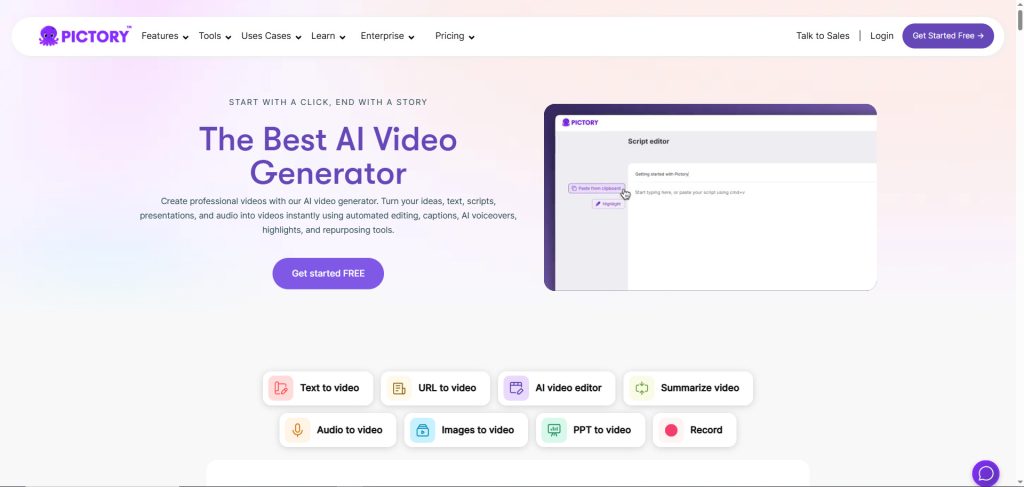
Pictory is an AI video generator designed to help creators turn scripts, articles, and long-form content into short, publish-ready videos.
It’s not a full-fledged video editor like Final Cut Pro or DaVinci Resolve. Instead, it’s a smart video creation assistant that uses AI to:
- read your script
- understand context
- match the story to stock footage
- add captions automatically
- generate multiple video formats
Long story short, if your workflow involves a lot of writing or long content, Pictory saves hours of manual video editing.
Why I Decided to Write This Pictory Review
When I first tried Pictory, I was already working with tools like Kapwing, InVideo, and Canva. They all do pieces of what Pictory does, but none of them were actually built around transforming long-form text into video efficiently.
Since most of my content strategy revolves around SEO and repurposing blogs into videos (and even repurposing articles like Best Video Editing Software for Mac on tachilink.com), Pictory instantly caught my attention.
I tested it for:
- YouTube shorts
- Facebook reels
- LinkedIn content repurposing
- Turning long blog posts into video summaries
- Making quick affiliate review videos
And now you’re reading my honest conclusion based on all that testing.
Pictory Review: Key Features That Actually Matter
Below I break down each feature in the exact order of usefulness based on real creator workflow, not marketing hype.
1. Script-to-Video (The Feature I Use Most)
This is where Pictory shines.
I paste a script, hit generate, and Pictory instantly turns it into a multi-scene video using stock footage matched to my text.
Why it matters:
If you write content—YouTube scripts, blog posts, Reddit answers, newsletters—Pictory turns all of it into video.
What I like:
- Scene-by-scene control
- Fast render time
- Solid footage suggestions
- Auto captioning baked in
- Easy adjustments
What I don’t like:
- Footage library feels repetitive if you use it daily
- Occasionally mismatches visuals and context
But overall, this feature alone makes Pictory worth paying for if you produce content consistently.
2. Article-to-Video (Perfect for Bloggers)
This feature is a blessing if you want to turn articles into videos for YouTube, TikTok, or to embed inside your blog.
I tested it on several of my posts on tachilink.com, and it performed surprisingly well. It automatically summarized long posts and turned them into video sequences.
What impressed me:
- It pulls the important parts of your article
- Converts headings into scenes
- Highlights key points
- Adds captions automatically
It basically turns your SEO content into multimedia content without manual editing.
This adds insane SEO value, especially if you embed videos on your blog posts.
3. Auto Captioning (Actually Accurate)
Captions are non-negotiable in modern video.
And honestly, Pictory’s caption accuracy is among the best I’ve used. It beats Canva, Kapwing, and even the built-in captions of many traditional editors.
What I like:
- Auto punctuation
- Editable word-by-word
- Brand styling options
- Perfect for silent video formats
If you post a lot of short-form content, this feature alone will make your workflow smoother.
4. Stock Footage + Music Library
Pictory uses a mix of paid and free stock footage sources.
Strengths:
- Wide variety of clips
- High resolution
- Quick load time
Weaknesses:
- Some clips feel generic
- Repeat usage becomes noticeable in high output volume
Still, for most creators, the library is more than enough.
5. Voiceover Options
Pictory includes AI voices, and some are decent—but let me be honest: it still can’t beat a real human recording.
The voices are:
- clear
- pleasant
- emotion-balanced
But they still have that AI cadence.
I recommend recording your own voice if you care about audience connection.
However, for faceless video channels, the built-in AI voices are good enough.
Pictory Pros and Cons (Straight to the Point)
Pros
- Extremely beginner-friendly
- Great for repurposing text content
- Saves hours of editing
- Accurate captioning
- Multiple export sizes (landscape, square, vertical)
- Strong for marketing content
- Ideal for short-form videos
Cons
- Video style can look templated if you don’t customize
- AI footage matching needs improvement
- AI voiceovers not perfect
- Not ideal for advanced editing
If you need a YouTube-level cinematic editor, Pictory isn’t it. But if you need speed, automation, and text-based content transformation, it’s fantastic.
Who Should Use Pictory?
You’ll love Pictory if you are:
- a blogger wanting video versions of articles
- a marketer producing short video ads
- a business owner creating social content
- a YouTuber building faceless channels
- a freelancer wanting to speed up production
- someone who hates editing but needs videos
You won’t like it if:
- you’re looking for a full editing suite
- you need detailed color grading or transitions
- you want total creative control
For high-level editing, tools like Final Cut Pro or DaVinci Resolve (both reviewed on tachilink.com) are better fits.
How Pictory Compares to Other AI Video Tools
Pictory vs InVideo
InVideo is more template-heavy and marketing-focused, but Pictory is better for long-form to short-form transformation.
Pictory vs Canva
Canva is more flexible, but Pictory is faster for text-to-video workflows.
Pictory vs Kapwing
Kapwing is great for editing but not for full automation like Pictory.
So overall, if your workflow starts with text, Pictory wins.
Pricing: Is Pictory Worth the Money?

Here’s the part most reviewers sugarcoat.
So let me keep it real.
Pictory is not cheap.
But the price makes sense when you consider how many hours it saves.
Is it worth it?
If you publish at least:
- 3 social videos a week
- or 4 YouTube shorts
- or long-form repurposed content
then yes, absolutely.
If you post once a month, probably not.
Final Verdict of My Pictory Review
After using Pictory solidly for real content creation, here’s my honest conclusion:
Pictory isn’t a magic tool. It won’t suddenly make you a better creator. But it will make you a faster one. And in today’s world, speed is leverage.
It’s not a replacement for full editing software. It’s a supplement—one that turns written content into video at scale with minimal effort.
If your business revolves around content, Pictory gives you momentum. If your business requires cinematic storytelling, you’ll need a more advanced option.
But for bloggers, marketers, and creators who want to expand into video without the painful learning curve, Pictory is a smart investment.
Should You Try Pictory Yourself?
If you’re reading this far, then yes—you should test it and see if it fits your workflow.
I encourage you to try the free trial or paid plan directly from the official website:
This way you get the latest features and updates straight from the source.
Internal Links for Further Reading
To compare Pictory with professional-grade editors, you can check these guides on TachiLink:
These help you see which tools align best with your content strategy.
Final Thoughts in This Pictory Review
So after everything, would I keep using Pictory?
Yes. Because it solves a real problem: turning written content into video fast.
It fits perfectly into a modern creator’s workflow, especially if you publish a lot of SEO or affiliate content like I do.
Is it perfect? No.
But is it powerful, reliable, and fast? Absolutely.
And speed is everything in content creation.
This article contains affiliate links. If you purchase a product through my link, I may earn a commission at no extra cost to you. This supports my work and helps me create more in-depth reviews like this.
FAQ “Pictory Review”
1. What is Pictory used for?
Pictory is an AI-powered video creation tool that helps users turn scripts, articles, and long-form content into short, ready-to-publish videos. It’s mainly used by content creators, bloggers, and marketers who want to produce videos quickly without advanced editing skills.
2. Is Pictory good for beginners?
Yes. Pictory is extremely beginner-friendly because the interface is simple and most processes are automated. Users don’t need editing experience to generate videos, captions, or scene transitions.
3. Can Pictory replace professional video editing software?
No. Pictory is designed for fast text-to-video creation, not advanced editing. While it saves time and automates workflow, editors who need full control over transitions, color grading, or audio design will still need tools like Final Cut Pro or DaVinci Resolve.
4. Does Pictory include stock footage and music?
Yes. Pictory provides access to a large library of stock footage, images, and background music. Most videos generated using Pictory are built from this library, making it easy to create professional-looking content quickly.
5. Is Pictory worth the price?
It depends on your workflow. If you create videos frequently, repurpose blog posts, or run a content-based business, Pictory saves a significant amount of time, making the cost worthwhile. If you publish only occasionally, you may not fully use its features.